Major Releases
Key Themes
- Automated Marketing – Features that generate new revenue for customers, with no work required
- Streamlined Workflows – Improved usability creates new efficiencies that save customers time, money, and headaches
- Better Patron Experience – Delivering more value to ticket buyers reduces headaches for box office teams while delighting patrons
What’s New
At On The Stage (OTS), we’re always innovating to make our platform easier, safer, and more powerful than before. Here’s a non-exhaustive list of some of our recent high-value releases.
Recently Released
The following features were released within the last few months.
Subscription Renewals
We’ve made it faster and easier for box office teams to build subscription packages, and to market them both to last year’s subscribers and the rest of your audience.
Key Benefits
- Build Subscriptions Faster – Create next year’s subscriptions from existing subscriptions, significantly speeding up the time it takes to build and launch your season
- Automatically Announce New Subscriptions – Automatically invite last year’s subscribers to resubscribe, and automatically announce new subscriptions to all non-subscribers
- Improve Accuracy – New subscriptions inherit seating sections, ticket types, and custom configurations, which eliminates double-entry, speeds up the creation flow, and reduces the chance of human error
Learn more in our release blog.
Redesigned Order Details Page
We’ve revamped the order details page to unlock new tools and efficiencies for box office teams.
New Features
-
Top-level “order overview strip” displays the order total, amount paid, refunds, items count, order date, and confirmation code
-
Displays patron contact details (name, phone, email, household, tags) in an editable card
-
Groups order items by production, and take per-event actions via buttons
-
Shows a financial history with a live breakdown of subtotal, fees, tax, and payment status
-
Payment history timeline shows a log of all payments, refunds, and exchanges
-
Clear CTAs let box office team collect payments for pending/reserved orders, send reminders, and process refunds and manage exchanged directly from the order page
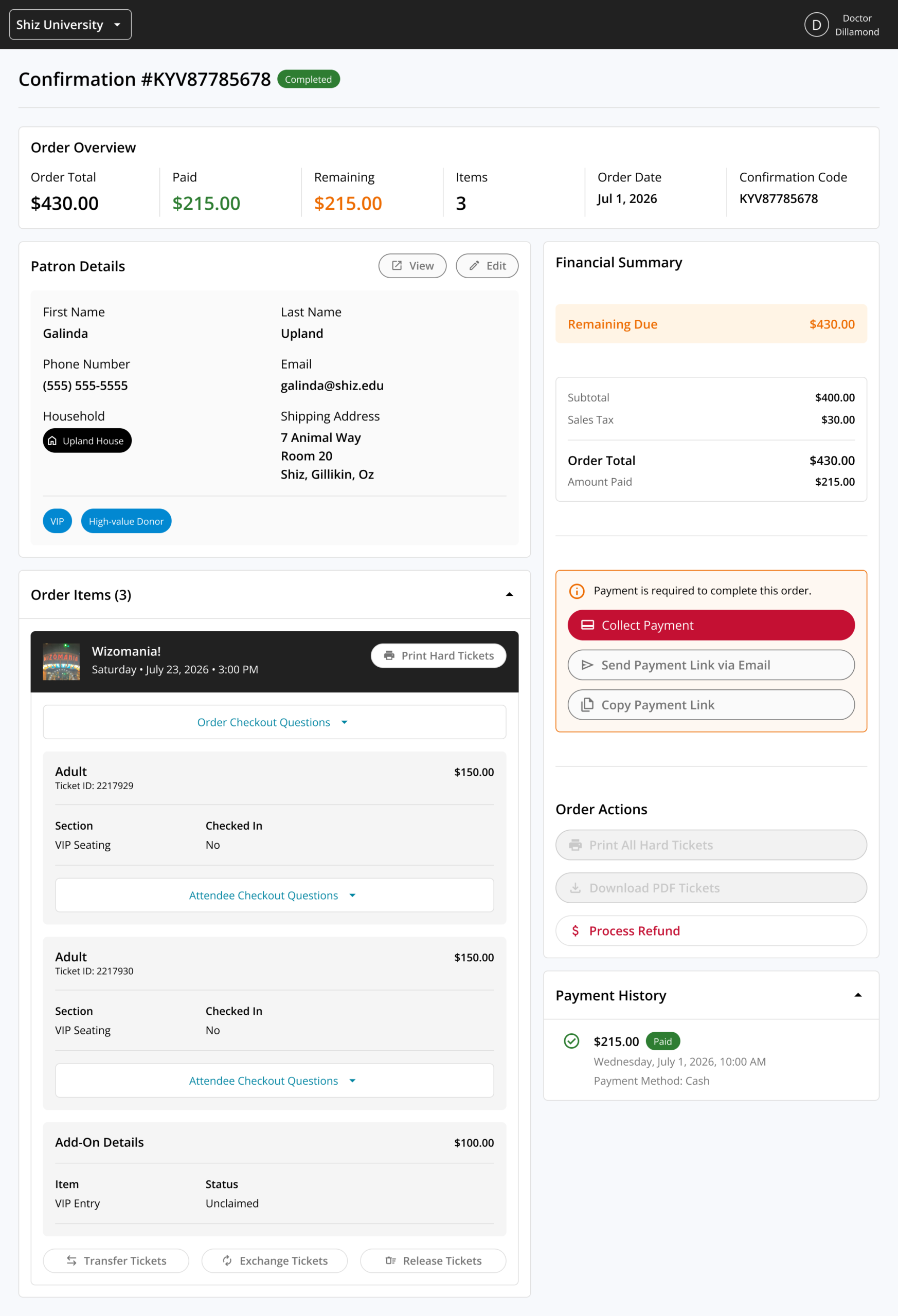
Taken collectively, the redesigned order management page doesn’t just look nicer (though we think it’s pretty great); it unlocks new tools and efficiencies that enable box office teams to quickly access important information, take action, and support patrons.
New Fee Controls
We’ve added new custom fee configurations, giving box office teams even more control over your fee structures.
Now You Can:
- Absorb fees on add-ons
- Set unique fees for add-ons and tickets
- Make custom fees a percent of a cart’s value, rather than a fixed value
Split Payment Support
Split payments gives your box office team two new ways to handle high-value transactions:
- Deposit + Balance — Reserve a spot by submitting a deposit now, then pay the remaining balance later.
- Split Tender — Pay for a single order using multiple payment types.
Great for:
- Summer camps and workshops
- Classes and multi-event series
- Group sales
- Premium ticket + add-on bundles
Together, these two modes make it significantly easier to process high-value sales without asking patrons to pay everything upfront.
Learn more in our release blog.
Redesigned Reporting Portal
We’ve redesigned the in-platform reporting portal to make it easier to quickly access the insights you need.
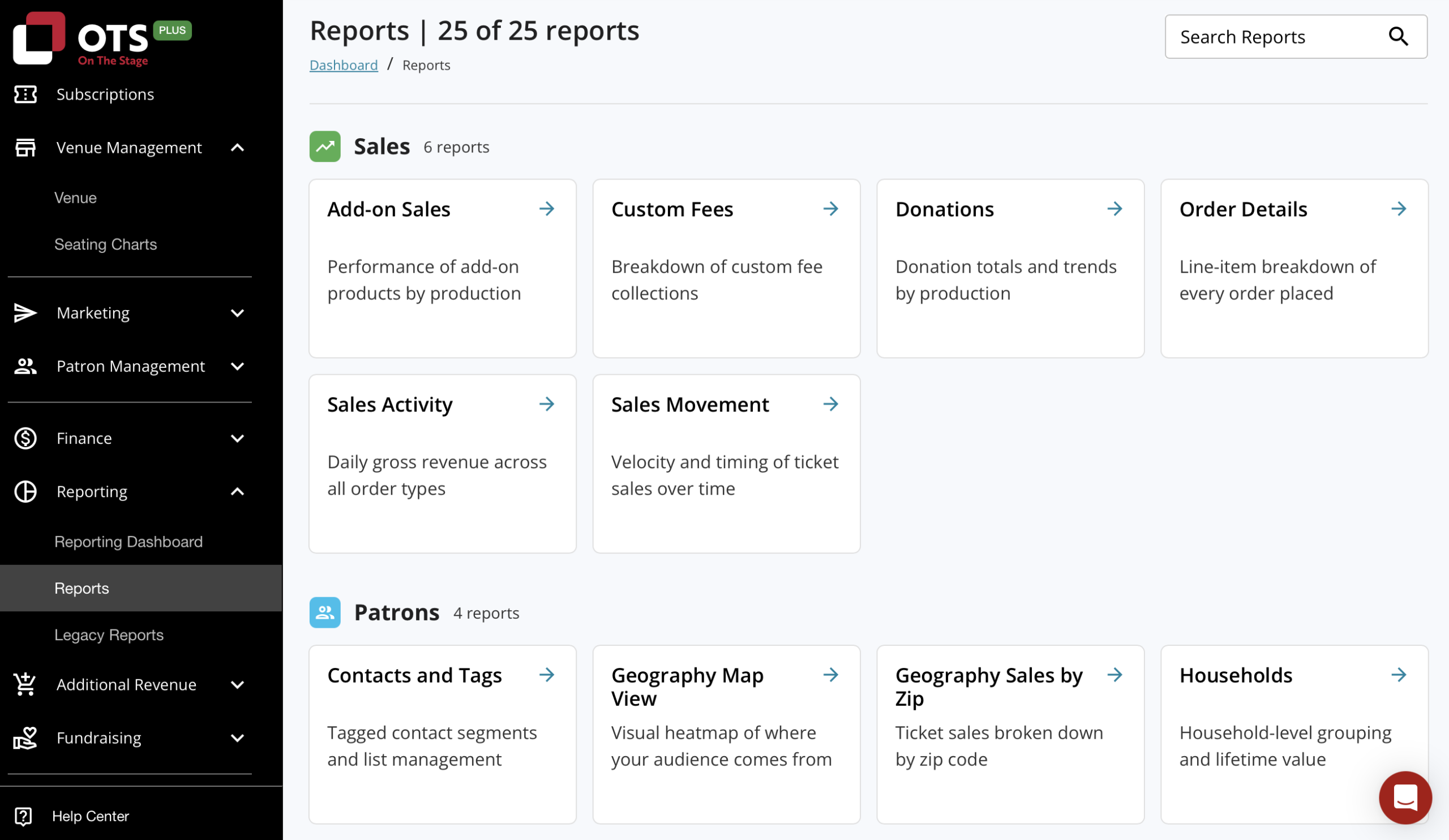
In addition to a clear, friendlier look and feel, the redesigned portal improves discoverability via a new search bar, and by grouping reports by functional area.
Multi-checkout Support
Patrons are now able to purchase tickets to multiple productions and performances in a single transaction, significantly improving the patron experience and reducing the time and effort required to make multiple purchases.
Customers can now configure their box office to allow sales in one of three ways:
- Single Performance: Patrons can only purchase tickets to a single performance (i.e. Shrek at 7 PM on Friday)
- Single Production: Patrons can purchase tickets to multiple performances of the same production in one transaction (i.e. Shrek at 7 PM on Friday and 2 PM on Sunday)
- Multi-cart: Patrons can purchase tickets to any mix of productions and performances in one transaction (i.e. Shrek at 7 PM this Friday and Noises Off at 7 PM next Saturday)
To learn more, read our release blog.
Event Gallery View
Display multiple upcoming events in a new unified gallery view that displays the event poster, making it easier for ticket buyers to see all of your upcoming programming. Gallery view joins the existing calendar, page, and list views for upcoming events, and is designed to improve event discovery for high-volume organizations such as comedy clubs, cabarets, and performing arts centers.
New Integrations
We’ve added several new integrations that make it easier to sync OTS information with other platforms. These integrations save time and improve accuracy by mitigating or eliminating the need to manually reconcile data between multiple systems.
Finance & Accounting
More easily sync OTS financial information with leading accounting platforms such as QuickBooks, Xero, Wave, and Zoho with optimized data exports.
Marketing
Automatically sync OTS patron contact information, audience segments, and more with Klayvio. This joins our growing suite of marketing integrations that already includes Mailchimp and Constant Contact.
New Presale Options
Improved functionality for subscriptions, presales, group sales, and venues with non-traditional seating setups.
- Offer subscription presales
- Configure multiple pre-sale windows for events, such as one for subscribers and another for volunteers
Plays: Always-on Marketing Automation
Keep patrons engaged automatically with OTS Plays — a new suite of automated marketing campaigns built for performing arts organizations.
Plays automatically deliver personalized, targeted outreach at key moments in a patron’s journey — from thanking first-time attendees to promoting subscriptions and soliciting donations — all using the patron data you already have in OTS. As each patron’s relationship to your organization evolves over time, Plays dynamically update to ensure that every patron receives the right message at the right time, which in turn drives higher engagement, retention, and revenue.
Plays are easy to set up, always on, easy to customize – no technical jargon or marketing degree required.
To learn more about Plays, check out the Plays release blog.
Patron & Donation Management Improvements
New features improve and enhance the ability to capture, track, and organize patron information, and to more effectively track and attribute donations.
- Offer box office-only fundraisers that aren’t visible online to more easily collect, manage, and track unrestricted donations
- Attribute cash donations to individual patrons and specific fundraisers
- Add custom tags to patron profiles to more clearly organize patron lists, and show tags on check-in lists to surface important information to box office teams
- Organize patrons into households and access household-level insights
- Improved donation tracking and reporting in patron profiles
- Easier access to key features and relevant insight via redesigned patron profiles and contacts dashboard
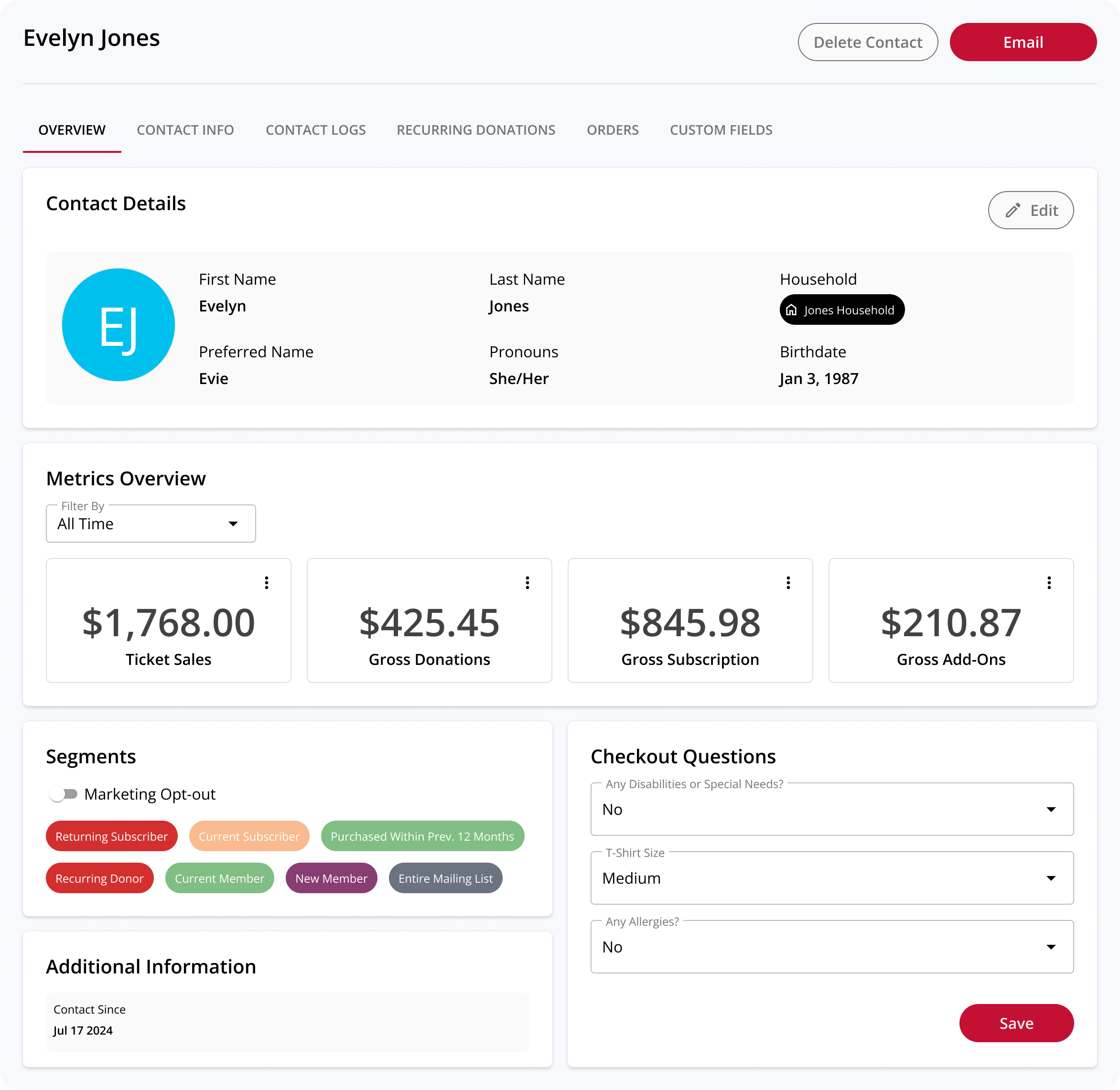
To learn more, read our release blog.
More Powerful Audience Segments
Create audience segments based on a variety of new attributes to unlock even more powerful marketing campaigns – both within and outside of OTS.
Customers can now build audience segments using insights related to:
- Productions – who purchased tickets to and/or attended a given production, performance, or event type
- Patrons – when patrons were added to your contact list, or by using any combination of custom or default fields from patron profiles
- Subscription & Memberships – who has purchased a given membership or subscription, who has unredeemed tickets, and who has fully redeemed their tickets
Segment creation is also easier than ever with clearly-organized attribute categories, a search function to quickly locate attributes, and the ability to create “NOT” relationships within compound segments.
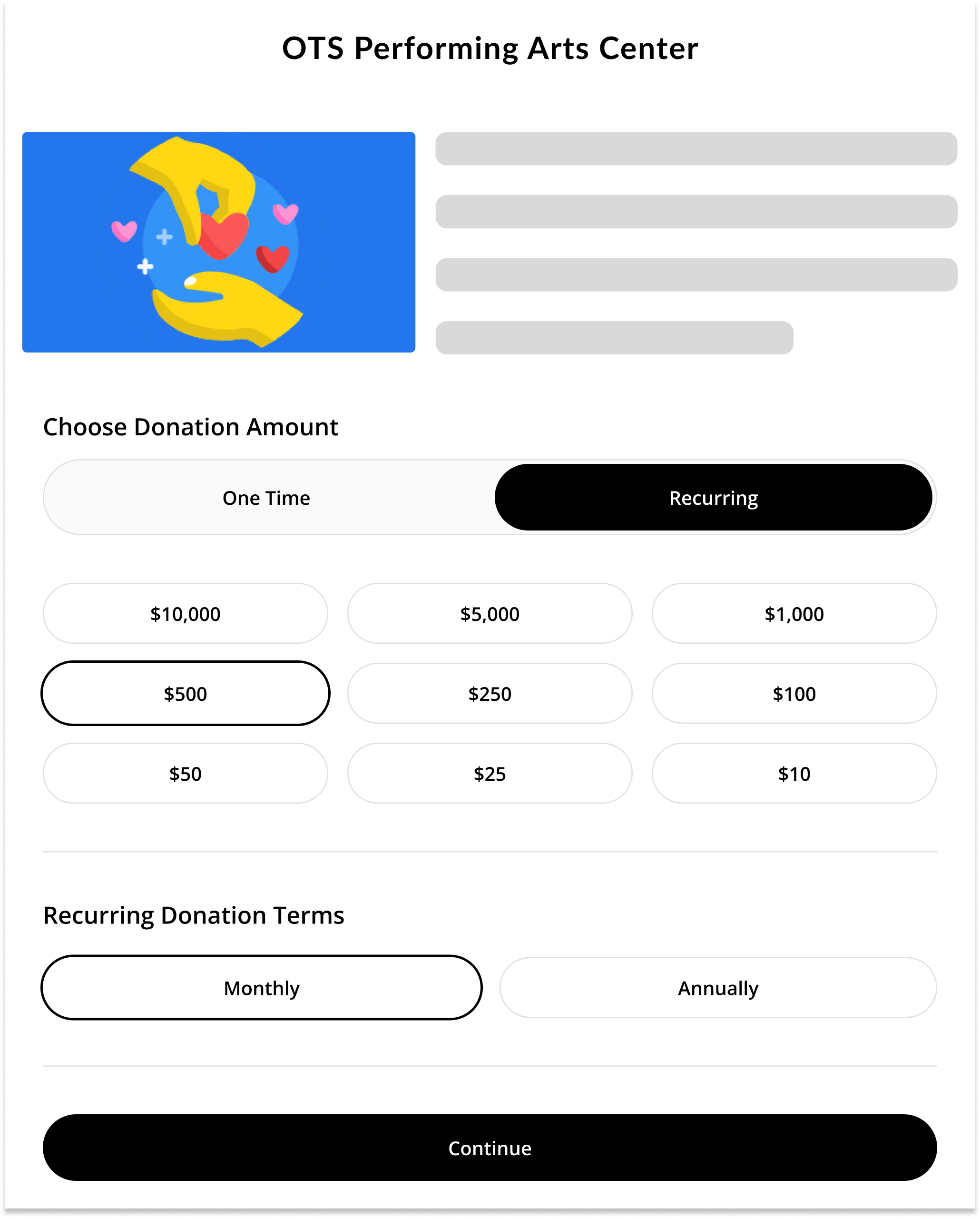
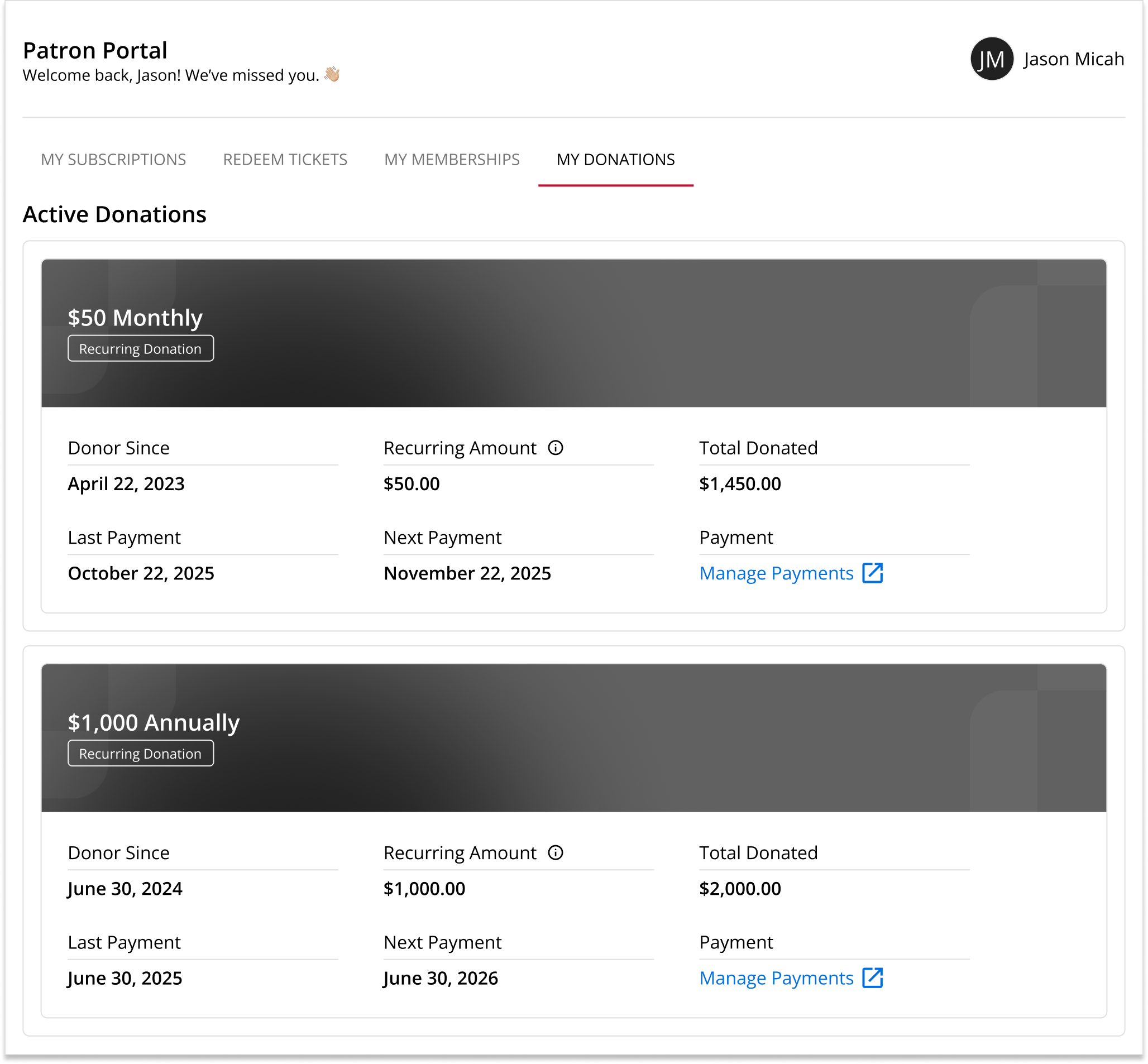
Recurring Donations
Enable patrons to opt-in to monthly or annual recurring donations, using preset amounts that you choose.
Self-serve Patron Portal
Empower patrons to manage their subscriptions, memberships, and recurring donations on their own in a centralized dashboard – without needing to create an account or remember a password.
Email Marketing Suite
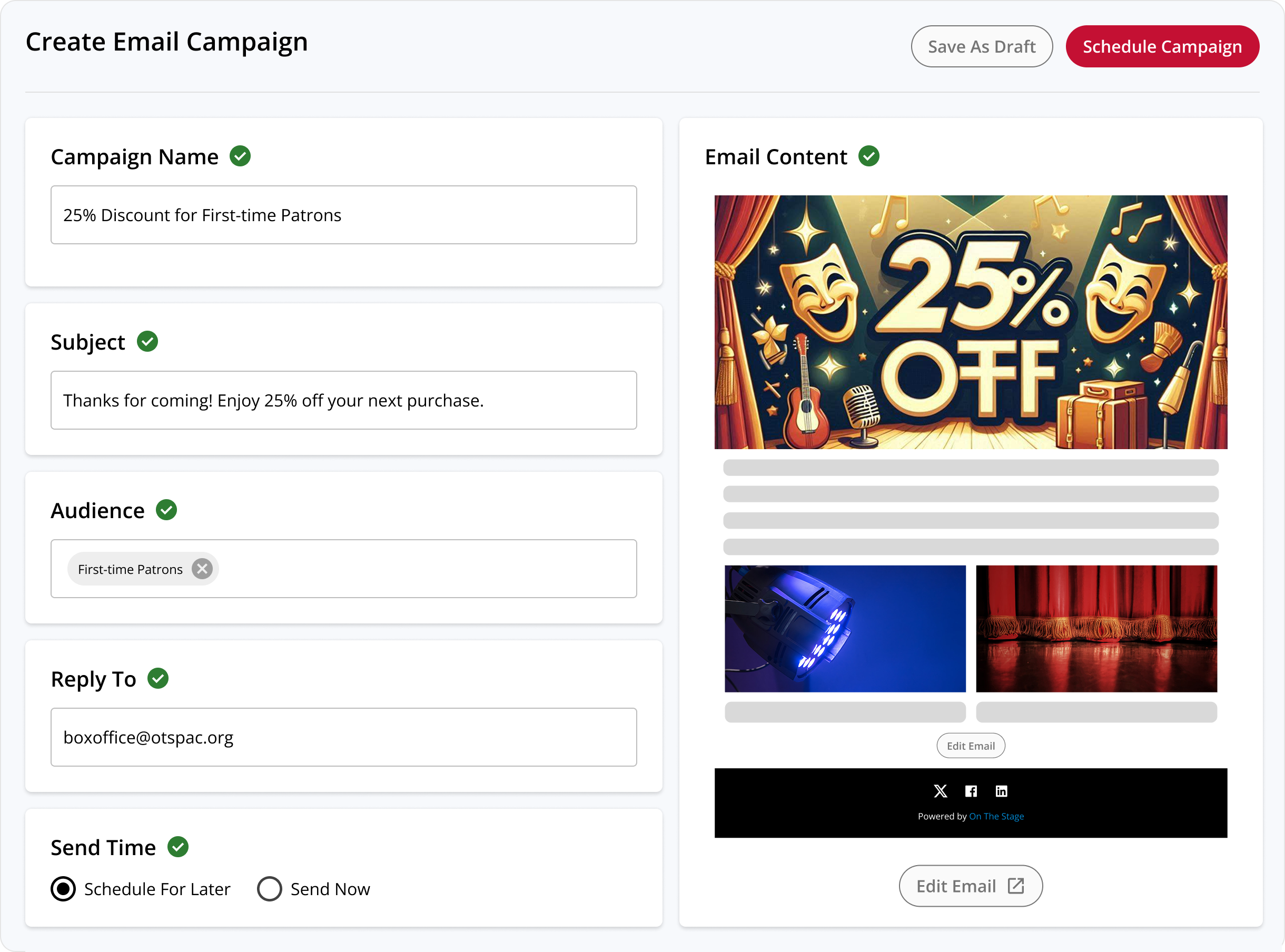
Now you can compose, schedule, and send beautiful marketing emails from within OTS, simplifying your workflow and eliminating the need (and expense) to maintain a third-party email marketing platform.
What You Can Do
- Send Emails with OTS – Compose, schedule, and send fully customizable emails using our easy, intuitive email builder
- Choose Any Audience – Send emails to your entire mailing list, or to specific segments of your audience that you create using your patron data
- Leverage Your Patron Data – Create custom audience segments using your patrons’ purchase, attendance, and donation history, and build targeted email campaigns that speak directly to them
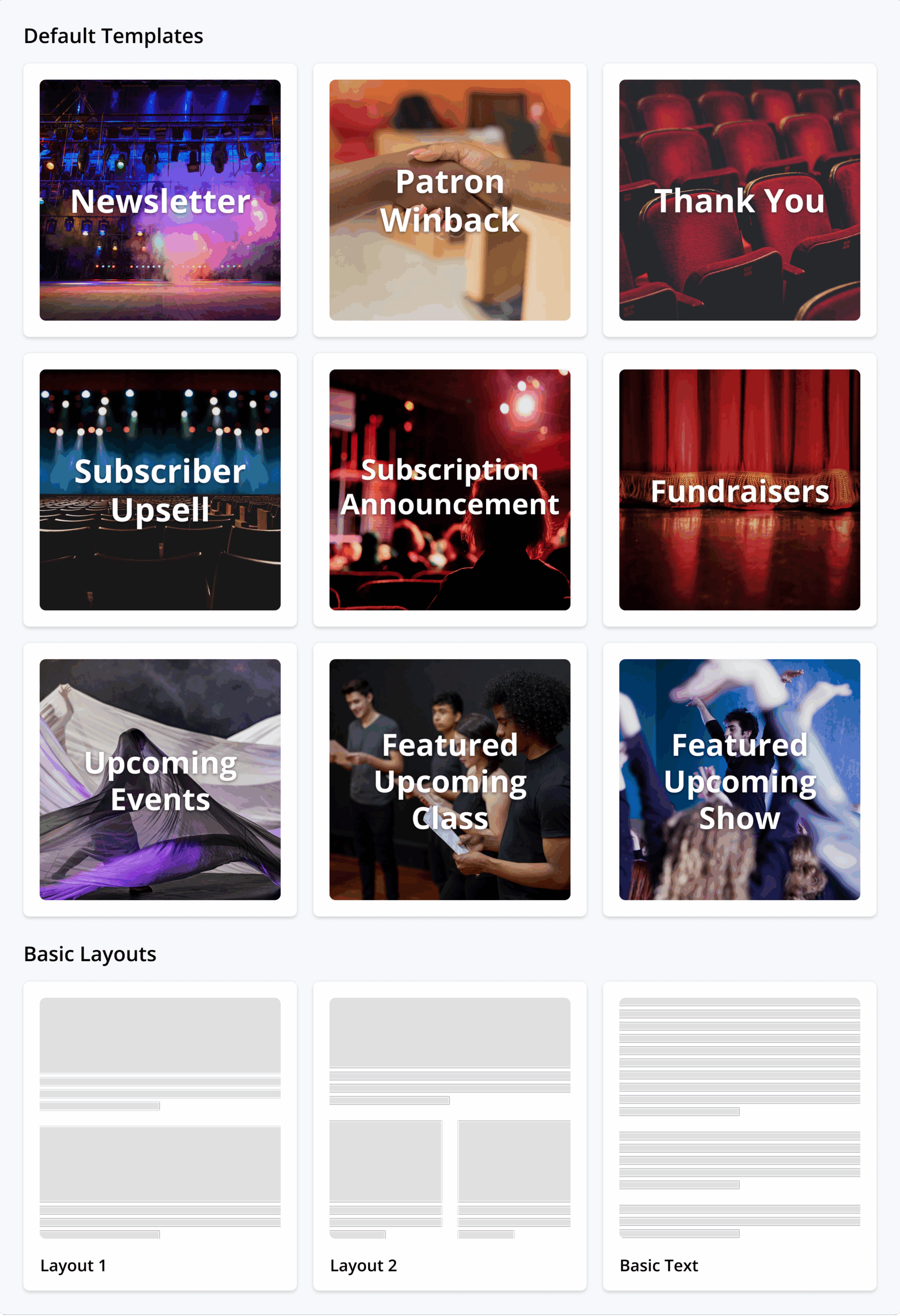
- Start From Templates – Choose from our list of pre-loaded templates and layouts, create and save your own custom templates, or start from scratch
- Schedule Sends – Set emails to automatically send later, save drafts, or send immediately
- Track Performance – Get real-time insight into how your emails are performing with patrons
Value to You
- Unify Your Marketing — Manage your website, email marketing, social media, and offline marketing all in one place
- Save Money – Eliminate the need for a standalone email marketing platform, and reclaim the subscription fees you currently pay to them
- Maximize Audience Engagement – Send targeted emails to custom audience segments built using your patron data that only exists in OTS, unlocking powerful new possibilities to deliver differentiated marketing messages that will resonate
- Simplify Workflows – Start from ready-to-use templates and layouts to build beautiful emails in seconds
- Maintain Brand Consistency – Emails sent from OTS use your branding, not ours, eliminating patron confusion and delivering a consistent, professional experience
See a complete list of features in our email marketing suite release blog.
Redesigned Box Office Portal
We’ve rebuilt the box office experience to be faster, more intuitive, and more feature rich than ever.
Key Improvements
- Improved Direct Sales: Comp subscriptions and memberships, apply custom discounts, capture patron info, and sell merch or concessions right at the box office — giving you more ways to serve your audience and grow revenue on the spot.
- Faster Event Creation: Build productions, performances, and recurring events in minutes with new time-slot scheduling and calendar views that streamline setup and keep everything organized
- Streamlined Workflows: A cleaner, more intuitive interface means fewer clicks, quicker updates, and easier management of sales, orders, and day-of-event operations
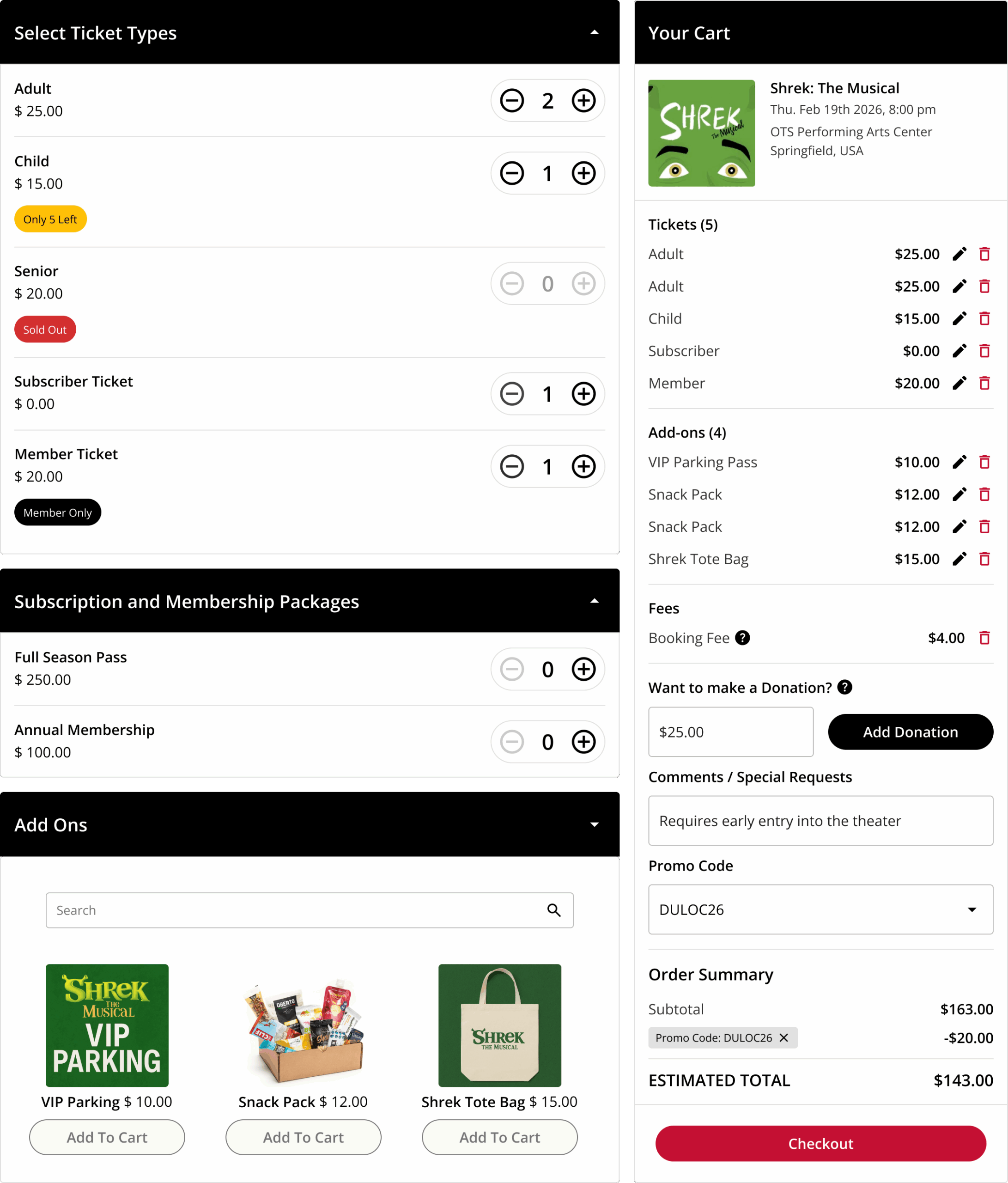
See a complete list of new features in our box office release blog.
New Ticket Types & Advanced Ticket Settings
New ticket types and more advanced settings give box office teams maximum control over ticket sales.
New Ticketing Options
Deliver a better patron experience, unlock new use cases, and eliminate workarounds with new ticket types.
- Pay What You Can – Let patrons choose their own price
- Members-only Tickets – Tickets that are exclusively available to your members
- Dependency Tickets – Tickets that can only be purchased in conjunction with another type of ticket (such as requiring a Child ticket be purchased with an Adult ticket)
- Bundled Tickets – Tickets that are bundled with add-ons, such as meal selections for dinner theatre or props packages for immersive productions
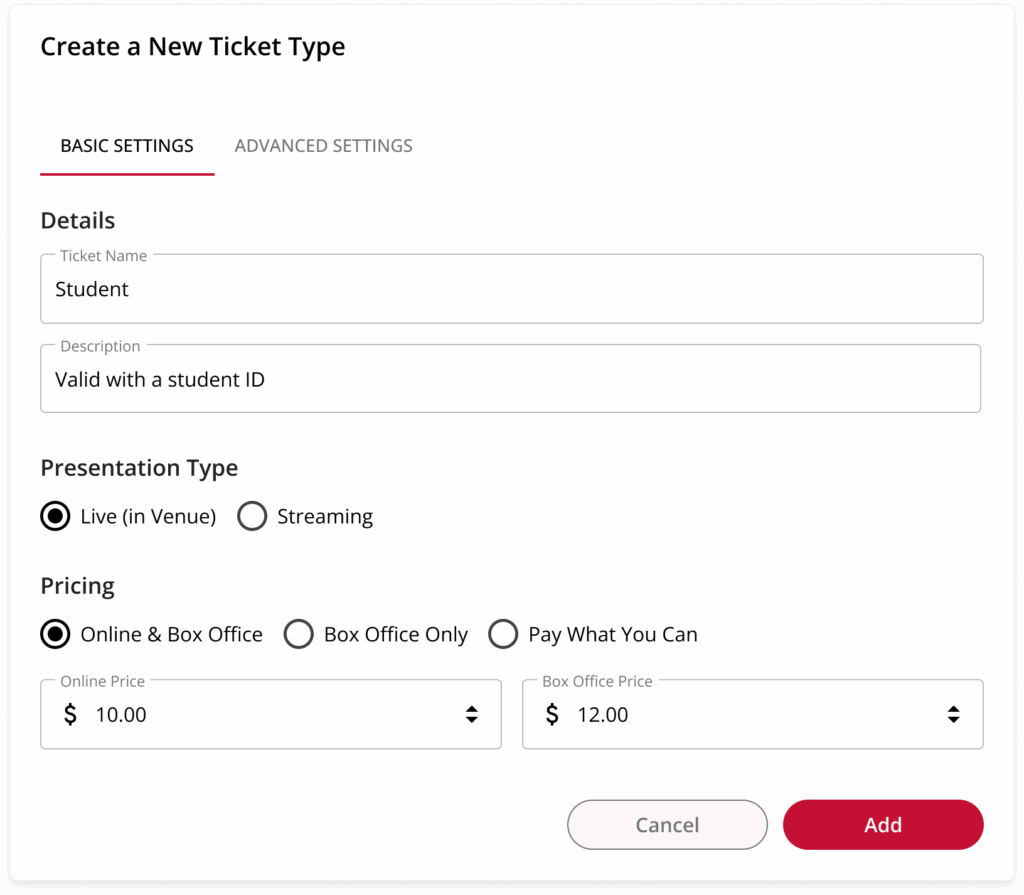
⚙️ Advanced Ticket Settings
Maximize control over your ticket sales while saving time and headaches.
- Purchase Limits – Set purchase minimums and maximums per transaction, performance, or production
- Production-level Tickets – Create a single ticket for your production, and attach it to any mix of performances
- Performance-level Customization – Add the same ticket to multiple performances, but customize the price and seating sections for each
- Dynamic Seating Charts – Set one price for Wednesday and a different price for Friday – all using the same ticket type
See a complete list of new features in our box office release blog.
New Patron Data Migration
New OTS customers can import historical purchase, attendance, donation, and contact information about their patrons from their previous ticketing solution. By migrating that data into OTS, customers can instantly take advantage of our built-in advanced marketing features (such as audience segmentation and custom purchase flows) rather than having to rebuild their patron database from scratch.
OTS Payments
On The Stage can now manage credit card processing on your organization’s behalf, creating new financial protections, enhanced security, and greater ease – all at no additional cost.
Benefits of OTS Payments
- Less Financial Risk: Rest easy knowing you’re never on the hook for chargebacks, fraud, or abuse
- Enhanced Security: OTS continues to provide the same level of advanced security that results in 10X less fraud than using Stripe alone
- Greater Ease: No need to maintain your own Stripe account
- Unified Reporting: View credit card processing and payment information within the OTS reporting dashboard without having to log in to Stripe
Learn more in our OTS Payments release blog.
Consolidated Marketing Emails
No one likes getting too many emails, which is why On The Stage (OTS) now consolidates all of our automated marketing emails that promote your upcoming productions into a single weekly email digest.
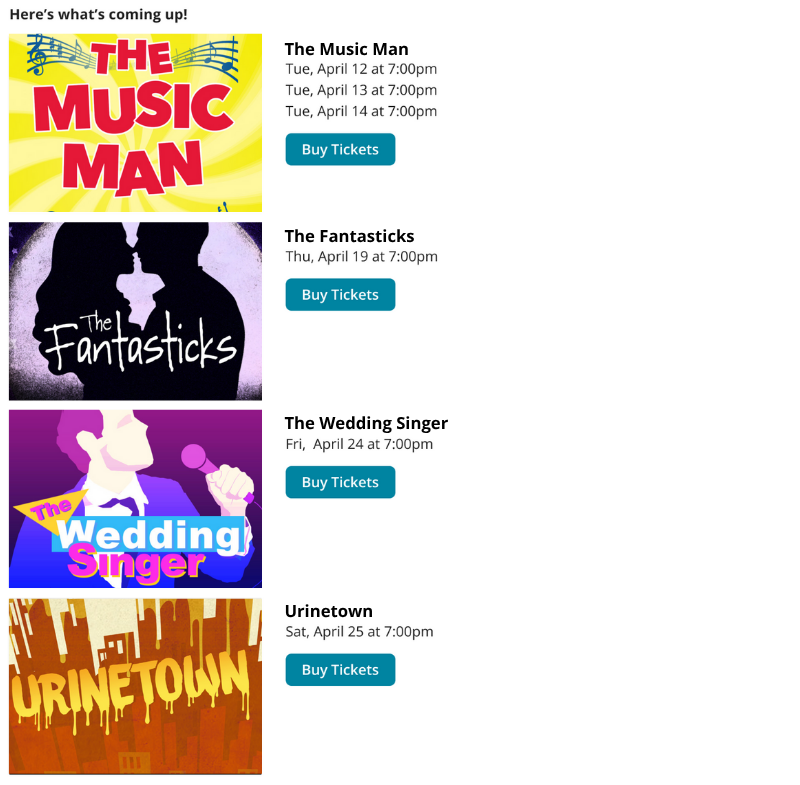
Instead of receiving individual emails that promote each individual production or event, your patrons will now receive a single weekly email that contains reminders about all of your upcoming programs. This reduces the overall number of emails your patrons will receive while still showcasing all of your upcoming programming. Customers on our Platinum plan also have the ability to customize the text of the email to give it your own personal flair.
Digital Wallet Support
On The Stage (OTS) now supports digital wallets, enabling your patrons to add OTS tickets, add-ons, and perks to Apple Wallet or Google Wallet with one click from their order confirmation email.
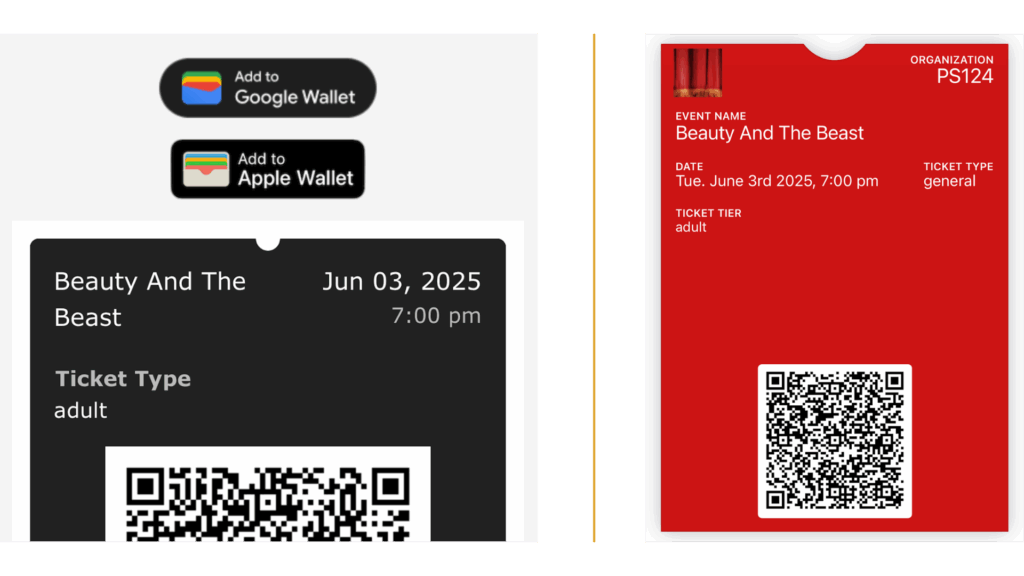
OTS Platinum plan customers can customize digital wallets with your own logo and brand colors, enabling you to provide a cohesive brand experience for your patrons.
New Production Creation Flow
We rebuilt our production creation flow to make it easier than ever to create productions, programs, and events.
The redesigned flow is faster, easier, more transparent, and more feature-rich, all while reducing the amount of time and number of clicks it takes to start selling tickets. By tweaking how we present existing features and introducing new ones, the new flow is streamlined to save you time, reduce errors, and unlock new capabilities.
Memberships
OTS makes it easy to build, sell, and manage high-quality membership programs that will resonate with your patrons – all in just a few clicks.
Benefits to Customers
- Financial Predictability – Memberships provide a steady income stream that your organization can count on
- Increased Audience Engagement – Members are more likely to attend multiple events, increasing overall attendance rates and reducing attrition
- More Marketing and Fundraising Opportunities – As your most loyal patrons, members are prime candidates to approach with additional opportunities to give, purchase, and engage
- Robust Audience Insights – Your members’ purchase and attendance behaviors help you to better understand patron preferences, enabling you to optimize your both programming and your marketing campaigns
- Greater Artistic Freedom – A committed membership base enables you to take creative risks and plan more ambitious productions
Benefits to Patrons
- Exclusive Seats – Designate specific seats or seating sections that are only available for members to purchase
- Discounts – Offer member-only discounts on tickets, concessions, merchandise, and more
- Early Sales – Give members early access to purchase tickets and subscriptions
- Member-Only Events – Host exclusive events, such as talkbacks and meet-and-greets, just for your members
Memberships can contain any mix of member-only discount codes, seats, and ticket types, and can be offered on a quarterly, monthly, or annual basis. For even more customization, OTS memberships also support automatic renewals, custom sales windows, tax-deductible status, fee control, and more.
To learn more, you can check out our memberships release blog.
Registrations/Checkout Questions
Now you can quickly and effectively gather the information you need during the purchase flow using checkout questions. From asking campers about T-shirt sizes and allergies to taking food orders for your upcoming dinner theater production, OTS now offers new standard checkout questions – or the ability to create your own – to collect any and all information you need.
Checkout questions are designed to support a variety of use cases, such as:
Camp & Class Registrations
- Centralize Attendee Info – Gather important details such as T-shirt size, nickname, birthday, and preferred pronouns
- Empower Safety – Mandate that registrants share critical safety information such as allergies, emergency contacts, and approved pickups and dropoffs
- Link Attendees – Ask about siblings, family members, and friends of attendees, enabling you to easily keep attendees together when needed
- Manage Multiple Attendees – Associate family members who register together with a single registrant account
Immersive Experiences
- Streamline Operations – Proactively ask about things like food selections, drink orders, or openness to audience participation
Community Engagement
- Assess Marketing – Understand how patrons heard about you to better assess the effectiveness of your marketing campaigns.
- Highlight Accessibility – Inquire about specific ADA needs to be able to best accommodate your patrons
- Support Artists – Allow audience members to specify who they are there to see
- Build Community Involvement – Ask patrons if they are interested in becoming members or volunteers
To learn more about these features and their benefits, be sure to check out our checkout questions release blog.
Cart Abandonment Reminders
OTS now helps customers to recover nearly 25% of lost ticket sales* via automated cart abandonment reminders. This always-on automated marketing feature is free for all OTS customers, and accounted for over $135,000 of additional ticket sales for our customers between April and June of 2025.
Cart abandonment reminders work by re-engaging patrons who didn’t complete a transaction via a pop-up during the ticket purchase flow, and/or a follow-up email that encourages them to finish their purchase.
*Actual performance results of all customers in Q2 2025.