What are Memberships?
Customer loyalty programs are a proven way for any organization to provide exclusive rewards that deepen the emotional ties with their customers, and it’s easy to understand why. Whether it’s a major airline, a corner coffee shop, or a performing arts organization like yours, people enjoy feeling like they’re part of a community, and having a sense that they are getting something special in return.
For performing arts organizations, membership programs make it easy to create new value for both you and your patrons without any upfront cost to you. Memberships are a proven way to generate new revenue while fostering greater loyalty and rewarding your best supporters.
According to a recent study, membership programs can do more than simply reward your most loyal patrons – they can significantly improve revenue and increase your overall number of patrons by as much as 20%. This growth is particularly concentrated among millennials, who tend to value loyalty and flexibility more than patrons of previous generations.
Zooming out, studies show that as many as 63% of consumers are willing to adjust their purchase behavior to maximize the benefits of a loyalty program. When further considering that, for most organizations, 80% of future revenue will come from the top 20% of their customers, the value of membership programs – both to you and to your patrons – becomes clear.
That’s why On The Stage (OTS) makes it easy for you to build high-quality, custom membership programs that will resonate with your patrons.
How Are Memberships Different Than Subscriptions?
Memberships and subscriptions are similar, but they aren’t the same. Both programs offer valuable benefits both to you and your patrons, and are proven ways to capture new revenue, boost attendance, and increase audience engagement.
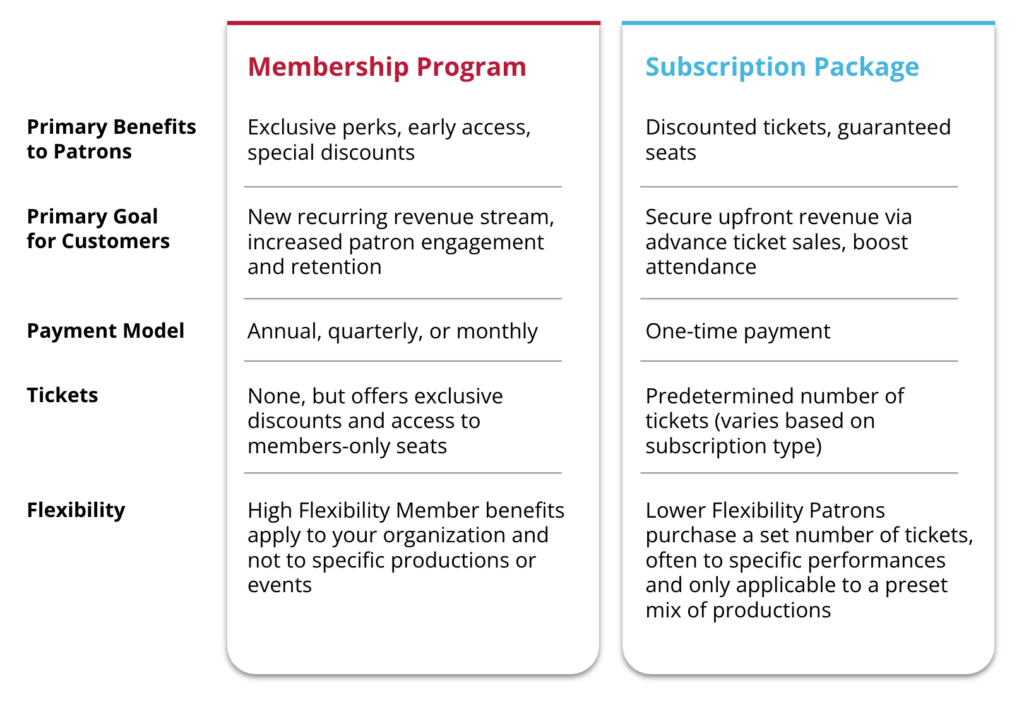
The key difference between the two is that subscriptions are bundles of tickets, whereas memberships are bundles of perks such as special discounts, access to members-only seats, and early access to sales. Financially speaking, each program offers a unique upside for your organization: subscriptions provide upfront revenue through advance ticket sales, whereas memberships create a steady stream of recurring income.
Here’s a breakdown of the differences between memberships and subscriptions:
Benefits of Membership Programs
Membership programs offer many benefits, both to you and to your patrons.
Benefits to You:
- Financial Predictability: Membership dues provide a steady, recurring income stream, allowing your organization to plan its season with confidence
- Increased Audience Engagement: Members are more likely to attend multiple events, increasing overall attendance rates and reducing audience attrition season over season
- More Marketing and Fundraising Opportunities: As your most loyal patrons, members are prime candidates to approach with additional opportunities to give, purchase, and engage
- Enhanced Community Loyalty: Memberships create a sense of belonging that helps you build and strengthen relationships with patrons, sponsors, and local businesses
- Greater Artistic Freedom: A committed membership base enables you to take creative risks and plan ambitious productions
- Robust Audience Insights: Your members’ purchase and attendance behaviors help you to better understand your patrons’ preferences, enabling you to optimize your both programming and your marketing campaigns
Benefits to Your Patrons:
- Exclusive Seats – Designate specific seats or seating sections that are only available for members to purchase
- Discounts – Offer member-only discounts on tickets, concessions, merchandise, and more
- Early Sales – Give members early access to purchase tickets and subscriptions
- Member-Only Events – Host exclusive events, such as talkbacks and meet-and-greets, just for your members
Key Features of OTS Memberships
OTS comes preloaded with a comprehensive suite of features that enable you to build high-value membership programs in minutes. With OTS, you can:
- Designate Exclusive Seats: Specify specific blocks of tickets that are only available for your members to purchase
- Offer Flexible Terms: Create membership programs that last a month, a quarter, or a year
- Enable Auto-Renewal: Set memberships to automatically renew at the end of their term
- Automate Renewal Reminders: Automatically let patrons know when their membership is about to renew
- Make Tax-Deductible: Specify whether or not the membership dues will or will not be tax-deductible for your patrons
- Set Sales Limits: Specify the time frame when memberships are available for purchase, and the total number of memberships available
- Control Fees: Optionally add additional fees associated with the membership
Creating a Membership
Memberships are created in OTS in the same creation flow as subscriptions, and they can be built in less than two minutes.
Start by navigating to the subscriptions dashboard, and then click the “Create New” button. When prompted to choose the subscription type, choose “Membership.”

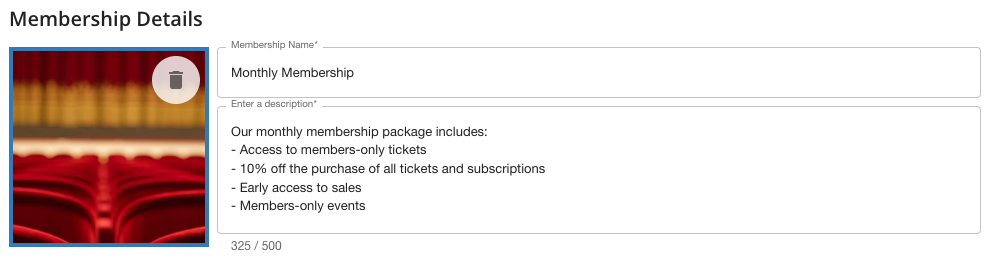
The membership creation flow will appear, where you can enter the details and adjust the settings of your membership. Begin by entering the membership details, including the name, a description, and a photo. This is the information that your patrons will see when they purchase their membership, so be sure to be as clear and detailed as possible.
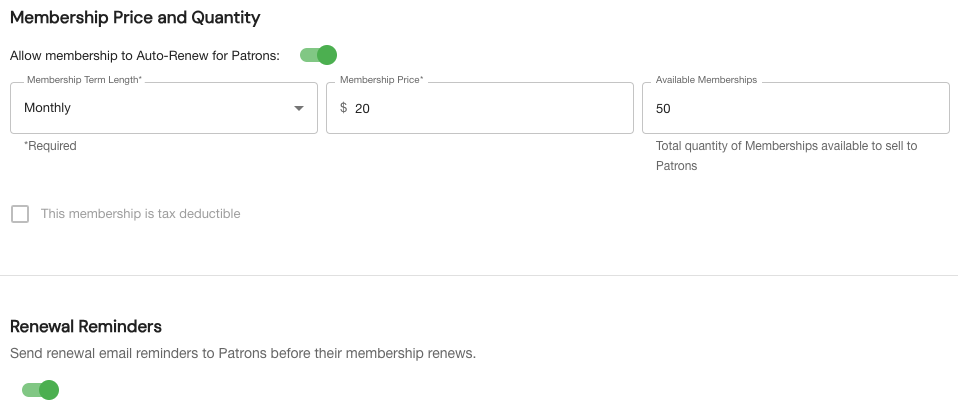
Next, you can adjust the settings of your membership, including:
- Term Length: Choose between monthly, quarterly, and annual
- Price: How much it costs
- Available Memberships: The total number of memberships for sale
- Tax-Deductible Status: Set the membership as tax-deductible (only available to eligible organizations)
- Renewal Reminders: Automatically remind members one week before their membership is scheduled to renew
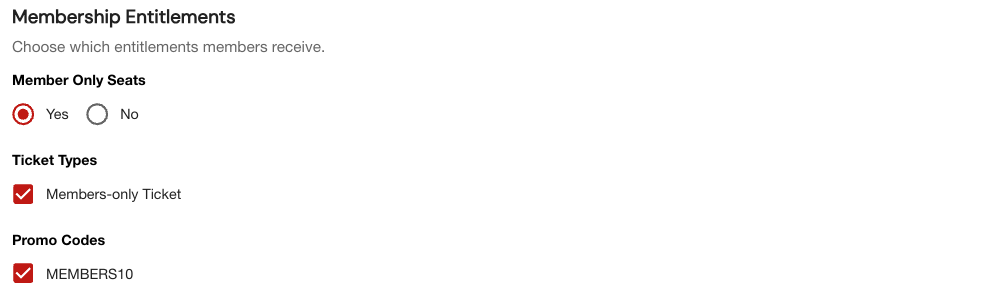
Next, you can specify which entitlements are included in your membership, which may include:
- Member Only Seats: Specify specific seats and seating sections that only members can purchase.
- Ticket Types: Create unique ticket types that are only available to your members. For example, if the cost of a regular general admission ticket is $25, you can create a members-only general admission ticket that only costs $20.
- Promo Codes: Offer special promo codes that only your members can redeem.
Prior to building our membership package, we first created a members-only promo code called “MEMBERS10” that gives members 10% of the price of tickets, as well as a unique ticket type* exclusively for our members. With those settings already in place, it’s easy to apply them to the membership package here with a single click.
Finally, you can choose your preferred fee structure, and optionally specify a window of time that the membership will be available for purchase.
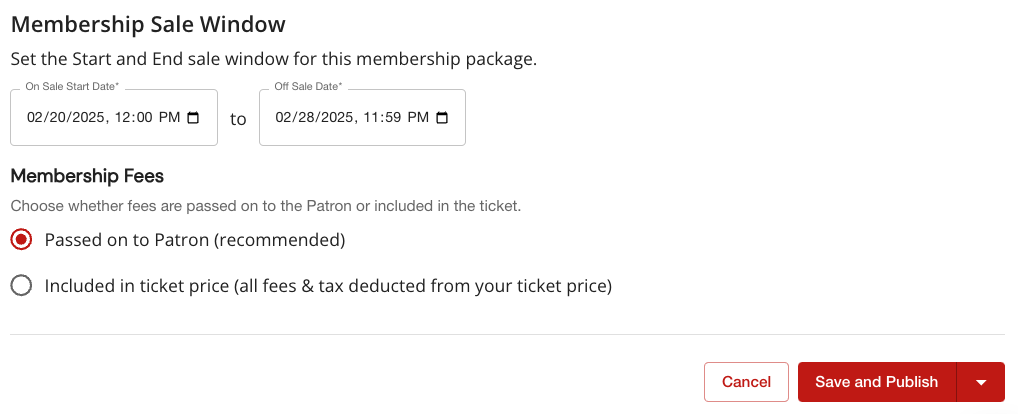
That’s it! Click “Save and Publish,” and your new membership will be instantly available for purchase on your site. Or, if you prefer, you can click the red arrow to save everything as a draft and publish it later.
Purchasing & Redeeming Memberships
Becoming a Member
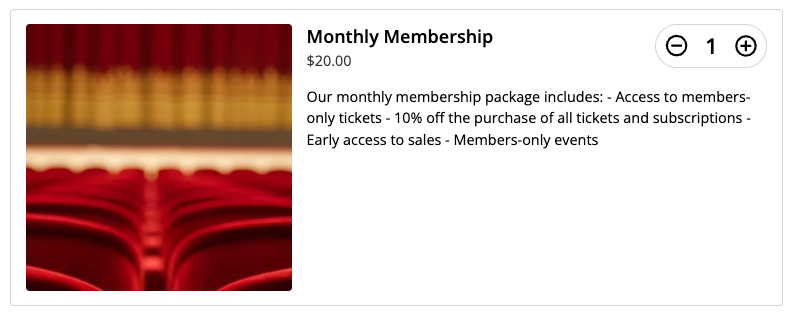
OTS makes it simple for your patrons to become members. To get started, patrons first go to your website and purchase their membership exactly as they would a ticket, subscription, or piece of merch. Patrons simply select the number of memberships they want, add them to their cart, and complete checkout in as few as four clicks.
Accessing Member Benefits
There are multiple ways that members can redeem their perks. The first is to log in as a member before they select the tickets they want to purchase, which can be done using just their email address – no password required.
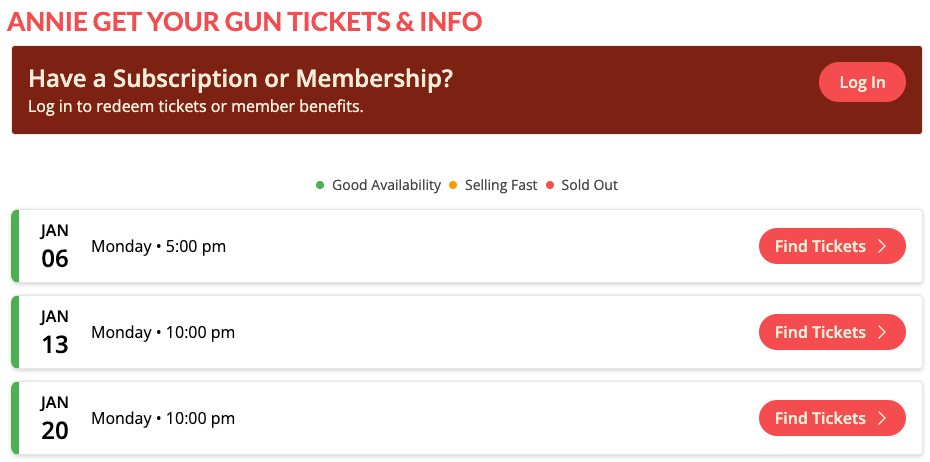
By logging in, your members gain instant access to the members-only seats, ticket types, and promo codes that you specified earlier. If your members don’t log in before they begin the purchase flow, don’t worry – OTS makes it easy for them to access their benefits later on.
Members-Only Seats
To redeem members-only seats, members simply select the performance they wish to attend and select their exclusive seats from the seating chart. OTS makes it clear which seats are only available to members by adding a special ticket icon to the seat, as shown below.
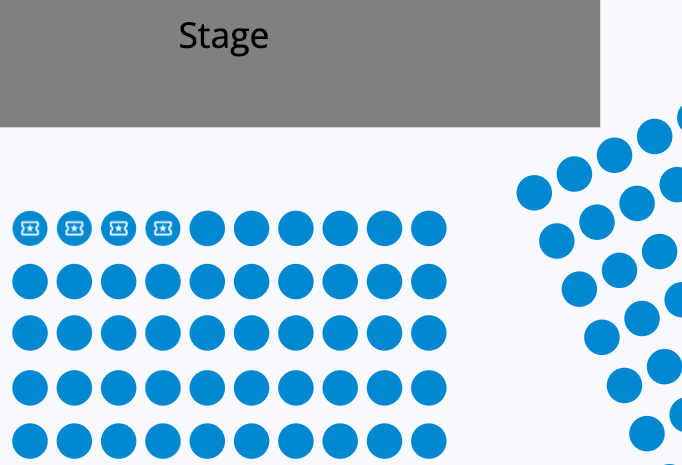
Once a members-only seat is selected, the patron will then be prompted to log in (if they aren’t already) to complete the transaction.
Members-Only Tickets*
For members who prefer to sit elsewhere, it’s easy to offer them comparable value with members-only tickets. For example, if an adult ticket costs $25, the same ticket could be made available to members for only $20. This allows you to provide continued value to your members regardless of where they choose to sit.
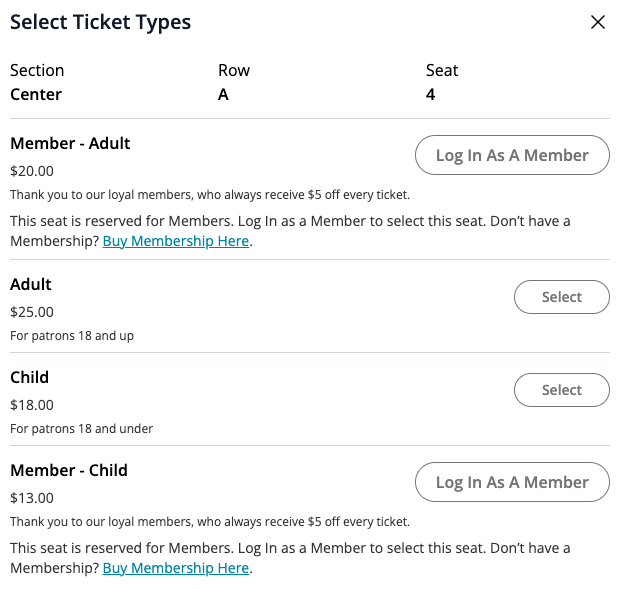
In addition to making it easy for members to access their exclusive tickets during the purchase flow, OTS also provides an opportunity for the rest of your patrons to become members at the point of purchase.
Once your members are finished adding their members-only seats, tickets, and promo codes to their cart, they simply complete the checkout process.
Getting Started
Memberships are available now to all OTS Empower and Platinum customers. To get started, simply navigate to “Subscriptions” in the left navigation bar.
To learn more about memberships or become an OTS Empower or Platinum customer, you can book a personalized demo or reach out to your account manager today.
*Member-only tickets coming soon