TL/DR:
- Build Subscriptions Faster – Create next year’s subscriptions from existing subscriptions, significantly speeding up the time it takes to build and launch your season
- Automatically Announce New Subscriptions – Automatically invite last year’s subscribers to resubscribe, and automatically announce new subscriptions to all non-subscribers
- Improve Accuracy – New subscriptions inherit seating sections, ticket types, and custom configurations, which eliminates double-entry, speeds up the creation flow, and reduces the chance of human error
The Need For Simpler Subscription Creation
Your subscribers are some of the most loyal people in your audience, and they’re the backbone of your recurring revenue. Keeping them close and getting them to come back next season should be simple — but for most box office teams, renewal season has meant rebuilding packages from scratch, sending renewal reminders by hand, and hoping nothing falls through the cracks.
We’re changing that. Our new subscription renewals workflow gives you the tools to bring last season’s subscribers back into next season’s packages faster, with less manual work and far less room for error. But we didn’t stop at improving how subscriptions get created – we took it a step further and connected subscription renewals directly into OTS’s automated marketing Plays to automatically re-engaging your subscriber base, saving the hassle of having to create a separate campaign from scratch.
Here’s what’s new.
Start Building Next Year’s Subscriptions Faster
Building next season’s subscription packages used to mean starting from a blank page every time. Now, you can duplicate an existing package – or any mix of them in bulk – instead of starting from scratch.
When you duplicate a package:
- The new package gets its own name and is automatically linked to the analogous package from last season, so the relationship is always clear.
- It inherits the details that carry over season to season, like seating sections and ticket types — no need to re-enter them.
- Every inherited field is fully editable, so you’re never locked into last year’s setup.
- When duplicating multiple subscriptions at once, you can bulk edit key details, such as on-sale dates and ticket prices, for multiple subscriptions with a single click.
- You’re automatically prompted to add which of next year’s productions and performances you’d like to include in each subscription.
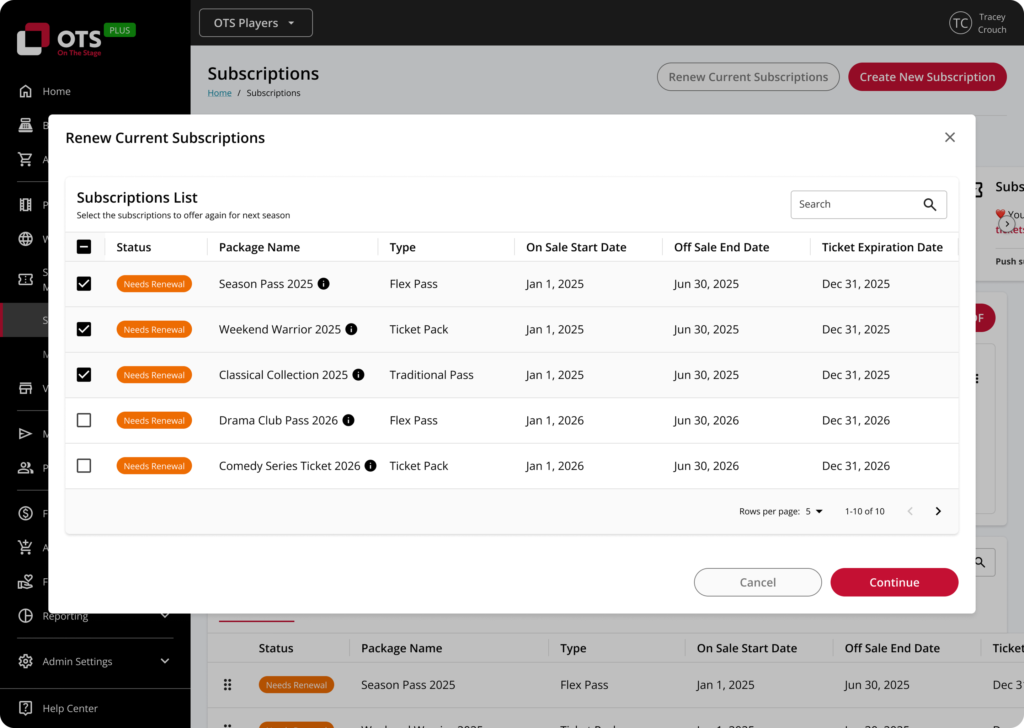
This flow is built for speed and consistency, while still allowing you to refine advanced details – one subscription at a time or in bulk – as you go.
Offer Your Subscribers First Access
Renewal season isn’t just about rebuilding packages — it’s about giving your most loyal patrons the right window to act before anyone else. New pre-sale window functionality lets you specify a dedicated pre-sale period exclusively for existing subscribers, so they get first right of refusal on next season before the general public sees anything. It’s the kind of VIP treatment that keeps subscribers coming back.
A Renewal Invitation That Sends Itself
Once your new packages are built, OTS automatically sends an email to your existing subscribers to invite them to re-subscribe — no manual list-building or send required. With just a few clicks, you can specify when subscribers receive the invite email, what it says, and how long they have to act. It’s a great first touch to get renewals moving without lifting a finger.
Prefer to send your own invitation? No problem – you can turn off the automated email invitation with a single click.
Let Patrons Renew Themselves
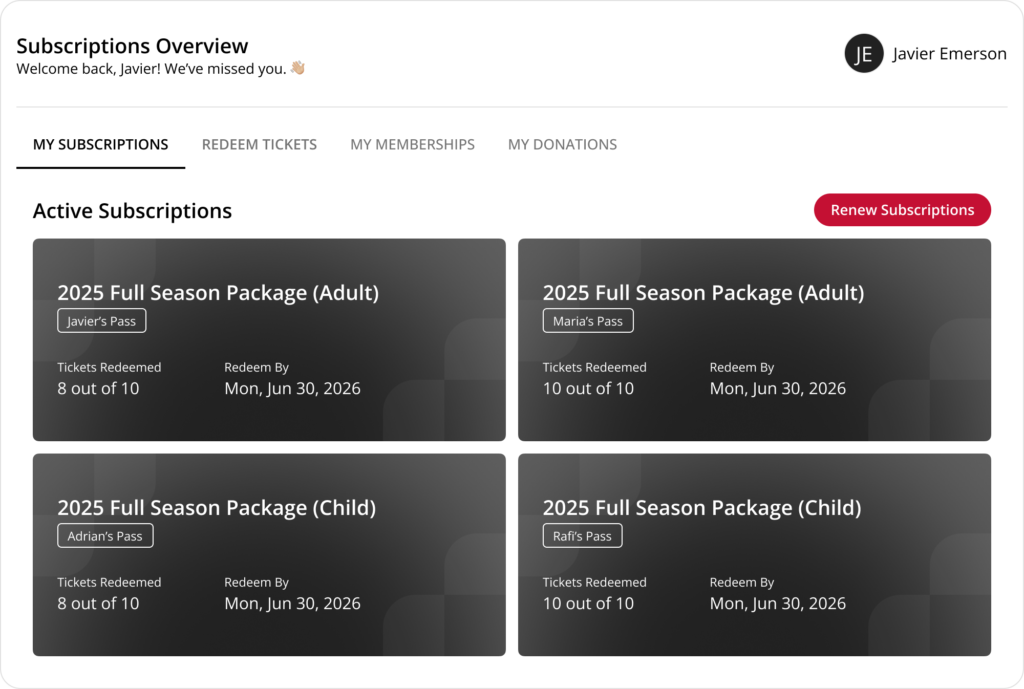
Once the word is out, we’ve also made it possible for subscribers to renew their own subscriptions directly through the patron portal – the same easy-to-use portal where they already manage their current subscriptions and memberships. That’s one less phone call, one less email, and one less line at the box office window during your busiest time of year.
Tell Everyone Else, Right on Schedule
Once your subscribers have had their moment to renew, we’ve also built a new Play to automatically announce the new season’s subscriptions to the rest of your patron base. That means your renewal and acquisition marketing run on the right sequence automatically — subscribers first, everyone else after — without you having to coordinate the timing yourself.
We also didn’t stop there: we also built a second new Play to announce new memberships to all non-members, making it a cinch to announce your entire season to the most relevant people at the time that matters most. (In case you were wondering, it’s already easy to build renewing memberships using OTS).
Like all Plays, these Plays can be set up in less than two minutes, can be customized using plain English (no jargon!), and continue to run in the background until you turn them off. It’s truly set it and forget it, working on your behalf to make sure the right patrons receive the right message at the right time based on who they are and what they care about.
A Dashboard Built for Renewal Season
We’ve also made updates to the subscriptions dashboard, so you have better visibility into how renewals are progressing as your window opens and closes — helping your team keep an eye on things without extra manual tracking.
The Bottom Line
Renewal season has always been high-stakes and time-consuming — rebuild packages, chase down subscribers, hope your marketing timing lines up. With this release, that entire process gets faster, more consistent, and largely automated, so your box office team can spend less time on data entry and more time on the parts of the job that actually need a human touch.
Ready to see it in action? Reach out to your OTS account team, or book a demo to learn more.