TL/DR:
On The Stage (OTS) has improved and enhanced the way you manage patron relationships and track donations:
- Improved donation tracking and fundraising attribution
- Add custom tags to patron profiles
- Organize patrons into households and access household-level insights
- Easier access to key features and relevant insight via redesigned patron profiles and contacts dashboard
A Better Way to Manage Patrons and Donations
Managing patron relationships is too critical to the success of performing arts organizations like yours to be left to spreadsheets, side systems, or institutional memory. Your team should be able to easily see who your patrons are, how they’re connected, and how they support your organization—whether that’s at the box office, in development, or in reporting.
That’s why we’ve released several updates to patron management and donation tracking to make everyday work easier, and give box office teams clearer insight into patron relationships.
These improvements help performing arts organizations organize patron data more effectively, track giving more accurately, and more easily access important information at the right time.
Improved Donation Tracking and Fundraising Attribution
We’ve improved how donations and fundraising activity are tracked and surfaced throughout the platform.
Now you can:
- Offer box office-only fundraisers that are not visible online, making it easier to collect, manage, and track unrestricted donations
-
Attribute cash donations to specific fundraisers and initiatives
-
View donation activity directly on patron profiles and dashboards
-
Access new reports to showcase donor, donation, and fundraising activity
- Assign general ledger (GL) codes to fundraisers for easier financial attribution and reconciliation
By connecting donation data more clearly to patrons and households, box office teams gain more control over how they collect and attribute donations and are able to access the insights they need more quickly.
Custom Tags: Better Organization & Smoother Check-ins
A smooth check-in process at showtime begins with empowering box office teams with all of the information they need to best support patrons. That knowledge base goes beyond simply directing patrons to the correct seats: ticket scanners and box office staff need to easily access important information such as ADA needs, if someone requires a special accommodation, or if a person is a volunteer, donor, alumni, or board member.
To support that flexibility, you can now create and manage custom tags on patron profiles, and show those tags on check-in lists. On top of making it easier to deliver a first-class patron experience at check-in, it also supports box office teams pre-show by quickly surfacing important information, such as the number of audio-assist devices they need to have ready for tonight’s performance.
Now you can:
-
Organize patrons by criteria that matter to your team (VIPs, donors, accessibility needs, volunteers, board members, and more)
-
Bulk-assign tags and manage them from a dedicated dashboard
-
Surface relevant patron context automatically across patron profiles, reports, orders, and check-in lists
- Run tag-level reports to understand shared trends about patrons who are part of the same tag
An unlimited number of custom tags can be added to patron profiles to capture any qualitative information that is useful to your organization, and to save that information in OTS – allowing you to ditch spreadsheets and scratch pads.
Organize Patrons into Households
Patrons often engage as couples, families, or shared decision-makers. With new householding support, you can now group related patrons together using a dedicated household management dashboard.
Now you can:
-
Organize patrons into households
-
Import household data from legacy systems
-
View engagement and support at the household level
This is especially helpful for organizations managing subscriptions, family ticket buyers, and household-level giving—and reduces the need for manual data rollups.
Redesigned Patron Profiles and Contacts Dashboard
To support all of these updates, we’ve refreshed patron profiles and the contacts dashboard to make key information easier to understand at a glance. Patron profiles now clearly showcase recent ticket purchase and donation activity, custom tags, household relationships, and more – all in one place.
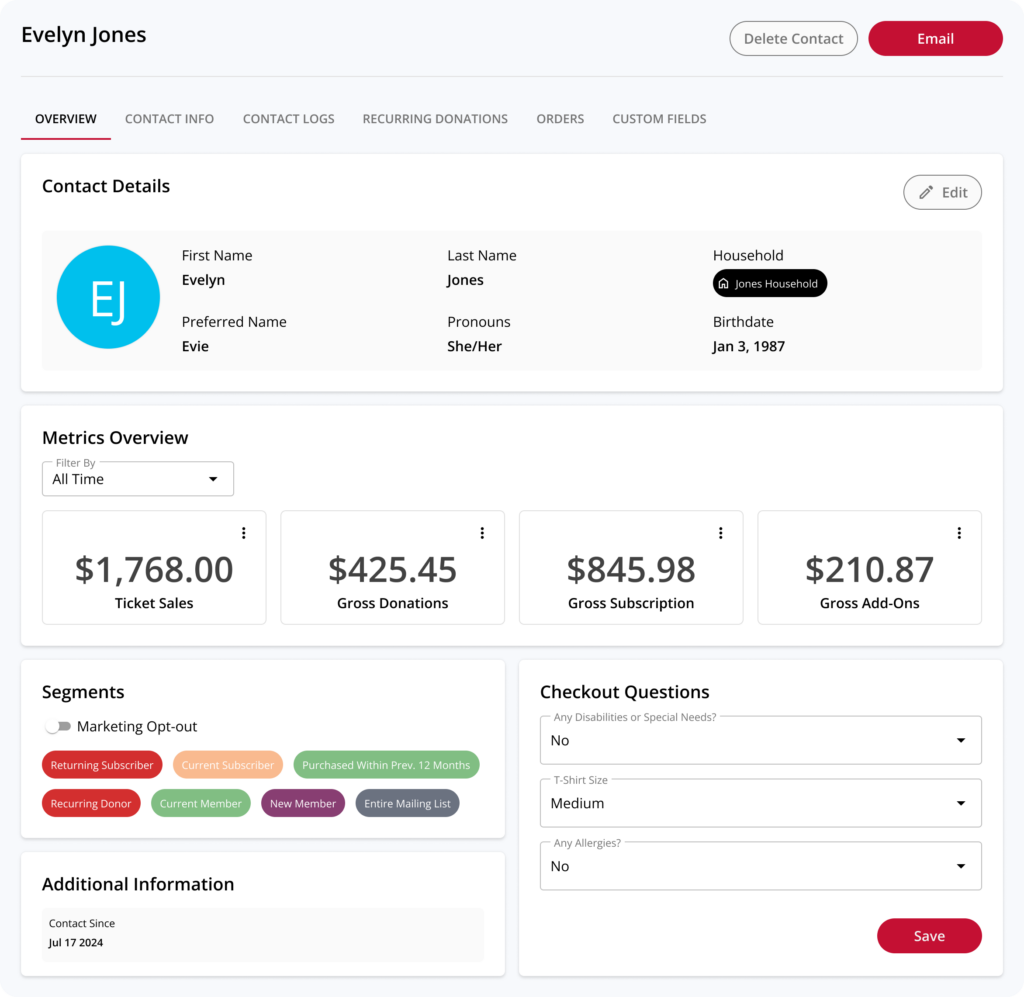
These UX improvements reduce clicks, improve clarity, and make patron data more accessible across teams.
A Better Way to Support Patrons
Together, these updates create a more robust patron management system inside On The Stage—reducing manual work, centralizing key information, and making it easier for teams to serve patrons and track support.
These features are all available now. Donation tracking improvements are included in our Essential and Plus plans, and custom tagging and household management are included in our Plus plan only.
To learn more about any of these features or for help getting started, please reach out to your Account Manager or book a demo.