For many performing arts programs, some of your most valuable offerings — summer camps, multi-week classes, group sales, premium ticket packages — also carry the highest price tags. And while your patrons want to participate, a single upfront payment for the full amount can be prohibitive for some.
That’s why we built split payments.
What Are Split Payments?
Split payments gives your box office team two new ways to handle high-value transactions:
- Deposit + Balance — Buyers can reserve their spot by submitting a deposit now, then pay the remaining balance later. You set the terms – such as number of payments, the amount of each payment, and the timeline – based on what works for you, and your buyers enjoy a new, more flexible way to pay.
- Split Tender — Buyers can pay for a single order using multiple payment types — cash, credit, card terminal, and gift card — in whatever combination works for them.
Together, these two modes make it significantly easier to process high-value sales without asking patrons to pay everything upfront.
Built for Your Biggest Transactions
Split payments are designed for exactly the kinds of high-value purchases where flexibility matters most:
- Summer camps and workshops — Reserve a spot with a deposit, and have some time before you pay the remaining balance
- Classes and multi-event series — Break a large purchase into manageable payments
- Group sales — Accommodate groups coordinating payments across multiple people or methods
- Premium ticket + add-on bundles — Make your highest-value packages more accessible
More Efficient Order Management
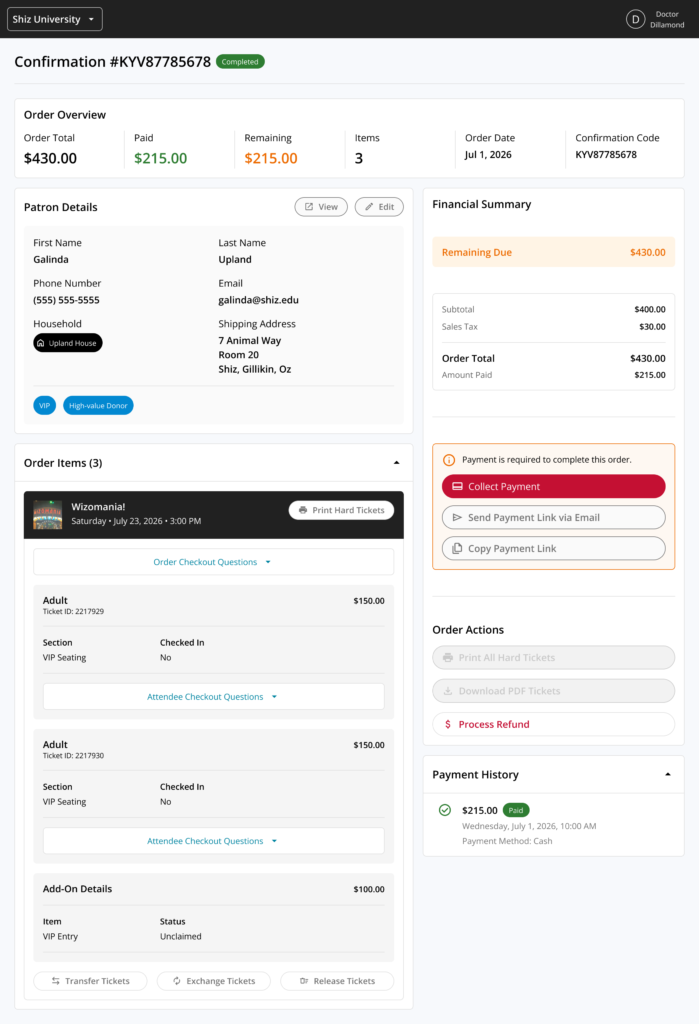
As part of this release, we’ve also redesigned the core OTS order management page in the box office portal (seen above). In addition to adding support for managing split payments, the new order page offers a host of new features.
New Features
-
Top-level “order overview strip” displays the order total, amount paid, refunds, items count, order date, and confirmation code
-
Displays patron contact details (name, phone, email, household, tags) in an editable card
-
Groups order items by production, and take per-event actions via buttons
-
Shows a financial history with a live breakdown of subtotal, fees, tax, and payment status
-
Payment history timeline shows a log of all payments, refunds, and exchanges
-
Clear CTAs let box office team collect payments for pending/reserved orders, send reminders, and process refunds and manage exchanged directly from the order page
Taken collectively, the redesigned order management page doesn’t just look nicer (though we think it’s pretty great); it unlocks new tools and efficiencies that enable box office teams to quickly access important information, take action, and support patrons.
Get Started Now
Split payment support is available now to all customers on the Plus plan – simply navigate to the box office and select “allow split payment” in the checkout flow. To learn more about how split payments and other premium features included in the Plus plan help our customers to consistently engage audiences and boost revenue at scale, customers should reach out to their Account Manager.
Not a customer yet? Simply book a demo to learn how OTS can help you to keep your audience engaged automatically with the ticketing, marketing, and revenue engine built for the performing arts and live entertainment.