Running a box office is no small feat—and the right tools can make all the difference. That’s why we’re thrilled to introduce the redesigned OTS box office suite: a faster, smarter, and more powerful way to manage events, ticketing, and patron experiences. Built to streamline workflows and unlock new possibilities, this release gives box office teams more control, flexibility, and ease than ever before.
Highlights
Click any bullet to jump down to learn more.
- ⚙️ Advanced Sales Controls – Enable box office teams to comp subscriptions and memberships, provide on-the-fly discounts, sell add-ons and collect patron information at the box office, and more
- ⚡️ More Powerful Event Creation – Add new productions, performances, and events more quickly than ever with recurring events and time slots
- ????️ New Ticket Types – Offer members-only tickets, create ticket bundles that include add-ons, and mandate that certain tickets can only be purchased under specific conditions that you set
- ???????? Greater Ease of Use – Work faster than ever with a new, more intuitive interface designed to streamline workflows, reduce headaches, and save time
Effective Box Office Management is Critical to Your Organization’s Success
If you’ve ever managed a box office, you know that having the right – or wrong – box office management tools at your disposal can mean the difference between a smooth experience and a world of headaches. Effectively managing your box office is critical to your organization’s success, which is why On The Stage (OTS) is excited to release a brand new box office management experience that’s designed to optimize the way box office teams create new productions and events, manage sales and orders, and handle day-of-event operations.
This release isn’t just a facelift (although we think it looks pretty great…) – the new box office portal also includes several new features designed to make life easier for box office teams and patrons alike. Whether you need to create dynamic seating charts, have more control over your ticket sales, or handle time-of-event patron issues with confidence, the OTS box office portal is faster, easier, and more capable than ever.
⚙️ Advanced Sales Controls
Let’s start with the obvious: the new OTS box office portal looks better than ever, with a reimagined layout that’s faster and more intuitive than before.
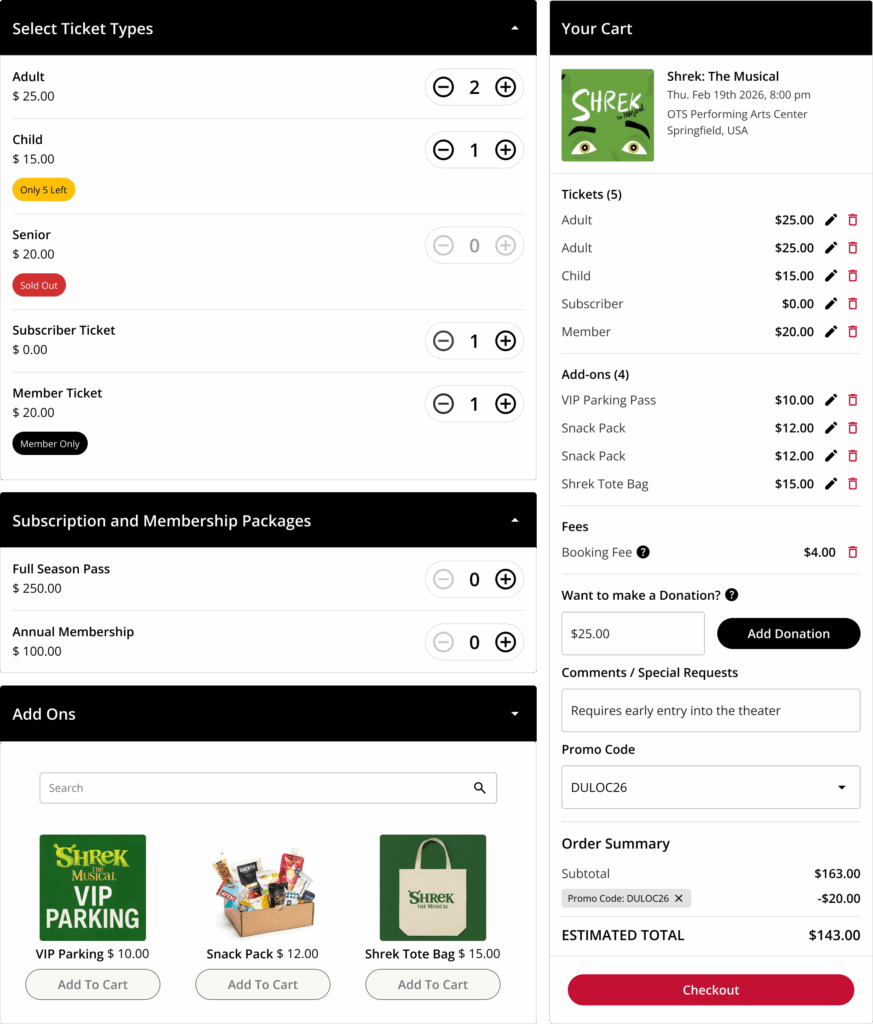
And when it comes to managing orders and making sales directly via the box office, there are several new features that unlock new value for your organization, your box office team, and your patrons.
New Features
- Offer Free Subscriptions & Memberships – Offer complimentary non-recurring subscriptions and memberships
- Provide Custom Discounts – Empower box office staff to override the price of tickets and remove custom fees, enabling them to offer on-the-fly discounts to patrons
- Ask Questions During Checkout – Gather the information you need from your patrons at the point of checkout using customizable checkout questions, eliminating the need to manually follow-up with a separate survey or form
- Sell Add-ons – Sell merchandise, concessions, and more at the point of checkout, unlocking a new point-of-sale solution and creating new revenue streams for your organization
- Skip Required Fields – Enable box office staff to skip fields that are otherwise required at checkout, empowering them to address patron concerns more quickly and effectively
- Accept Checks – Allow patrons to pay with checks, creating a new option that helps you better serve your community
- Search for Promo Codes – Quickly find the promo code you need via search, enabling you to quickly apply the right code every time
⚡️ Faster Event Creation
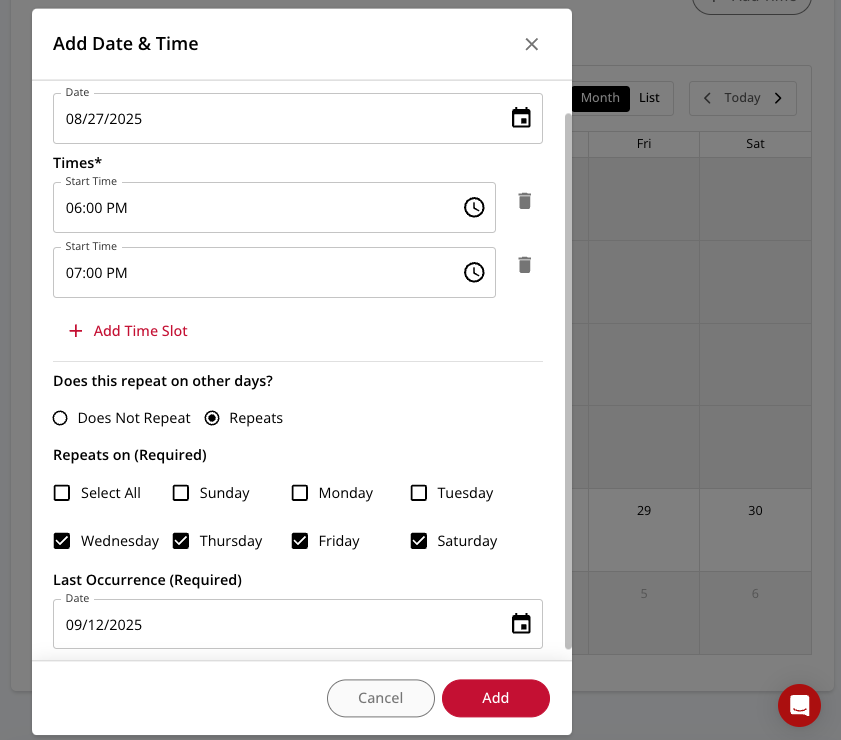
We’ve made it easier than ever to create productions, performances, and events and start selling tickets in two minutes or less.
New Features
- Time Slots – Add multiple time slots to any event, enabling time-based entry for location-based entertainment such as escape rooms, haunted houses, and immersive attractions (learn more here)
- Recurring Events – Create a single event and set it to recur on a cadence that you set (don’t worry – you can still customize settings for individual events even if they are part of a recurring series)
- Calendar View – See a full calendar of your events, and add and edit new events directly from the calendar
????️ New Ticket Types & Ticket Controls
OTS now offers several new ticket types that unlock new use cases and put even more power in the hands of box office teams.
Members-only Tickets
OTS now supports tickets that can only be purchased by members, making it easy to offer different (often lower) ticket prices to your members. For example, if a standard Adult ticket is $25, you could create an Adult Member ticket for only $20, which eliminates the need for member-specific promo codes to provide discounted tickets to your members. When combined with members-only seats and seating sections, OTS makes it easy to create high-value membership programs that give members preferred access to your best seats at the best prices.
Members-only tickets are visible to all patrons during the checkout flow, but are only accessible to members who have logged in. Don’t worry – we make it easy for members to log in during the checkout flow, and we provide an integrated opportunity for non-members to purchase a membership.
Pay-what-you-can Tickets
Making your programming accessible to everyone in your community is easier than ever with pay-what-you-can (PWYC) tickets. By enabling the patron to set their own price (and showing them your suggested price in the process), you can share your productions with more people that ever, while filling more seats in the process.
Similar to other ticket types, PWYC tickets can be limited to specific performances and seating sections. Customers can also set a minimum ticket price as well as the maximum number of PWYC tickets available.
Dependency Tickets
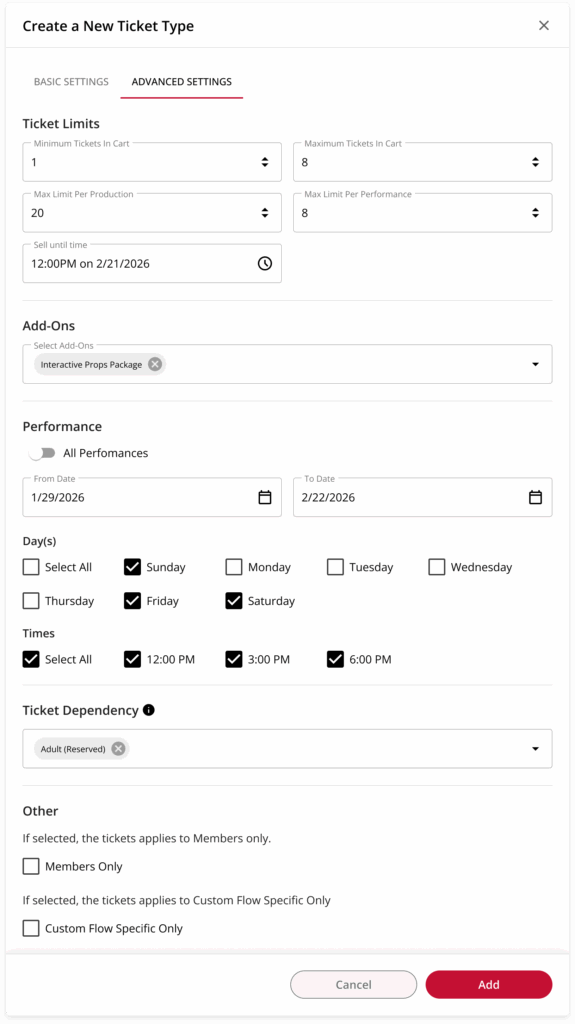
For situations where you wish to require that certain tickets can only be purchased in conjunction with another type of ticket, OTS now offers dependency tickets. With dependency tickets, customers can specify another type of ticket that must be in the same cart in order to be purchased.
This is useful to ensure that a patron can only purchase a Children’s ticket if an Adult ticket is also in the cart, or make sure that ADA Companion seats can only be purchased in conjunction with an ADA accessible ticket.
Bundled Tickets
Box office teams can now attach add-ons to tickets, making it easy to offer ticket bundles that appear to the patron as a single item during the checkout flow.
Bundled tickets make it possible for patrons to select a meal choice for your upcoming dinner theatre production, add a props package to an immersive theatre experience, or include exclusive perks with your most premium tickets.
When coupled with an unlimited ability to create add-ons for merch, concessions, experiences, and more, ticket bundles are an infinitely flexible tool for box office teams.
Advanced Ticket Controls
We’ve put more power in the hands of box office managers with several new advanced customization features that apply to any and all OTS tickets.
- Purchase Limits – Specify the minimum and maximum number of tickets that can be in a patron’s cart, as well as the maximum number of tickets that can be purchased for a single production or performance
- Reusable Tickets – Create a single ticket for your production, and attach it to any mix of performances associated with that production. (Create a single Weekend Adult ticket and attach it to both your Friday and Saturday night performances, for example)
- Per-performance Customization – Add the same Adult ticket to your Wednesday and Friday performances, but customize the ticket price and seating sections for each
- Dynamic Seating Charts – Using per-performance ticket customization, the same seat on a seating chart can appear as one price on Wednesday and a different price on Friday – all from the same ticket type
- Sell Until Times – Pre-set a date and time after which tickets can no longer be purchased
- Custom Flow Specific – Specify that a ticket is only accessible via a custom purchase flow, making it easy to offer (and track) ticket sales that result from advanced marketing motions
???????? Greater Ease of Use
Our new look isn’t just about aesthetics – the new layout is optimized to make life easier. The redesigned box office portal makes it easier to locate and access the features you need, while reducing the total number of clicks, windows, and manual inputs required to perform common tasks. All of that leads to a more-efficient workflow and time saved.
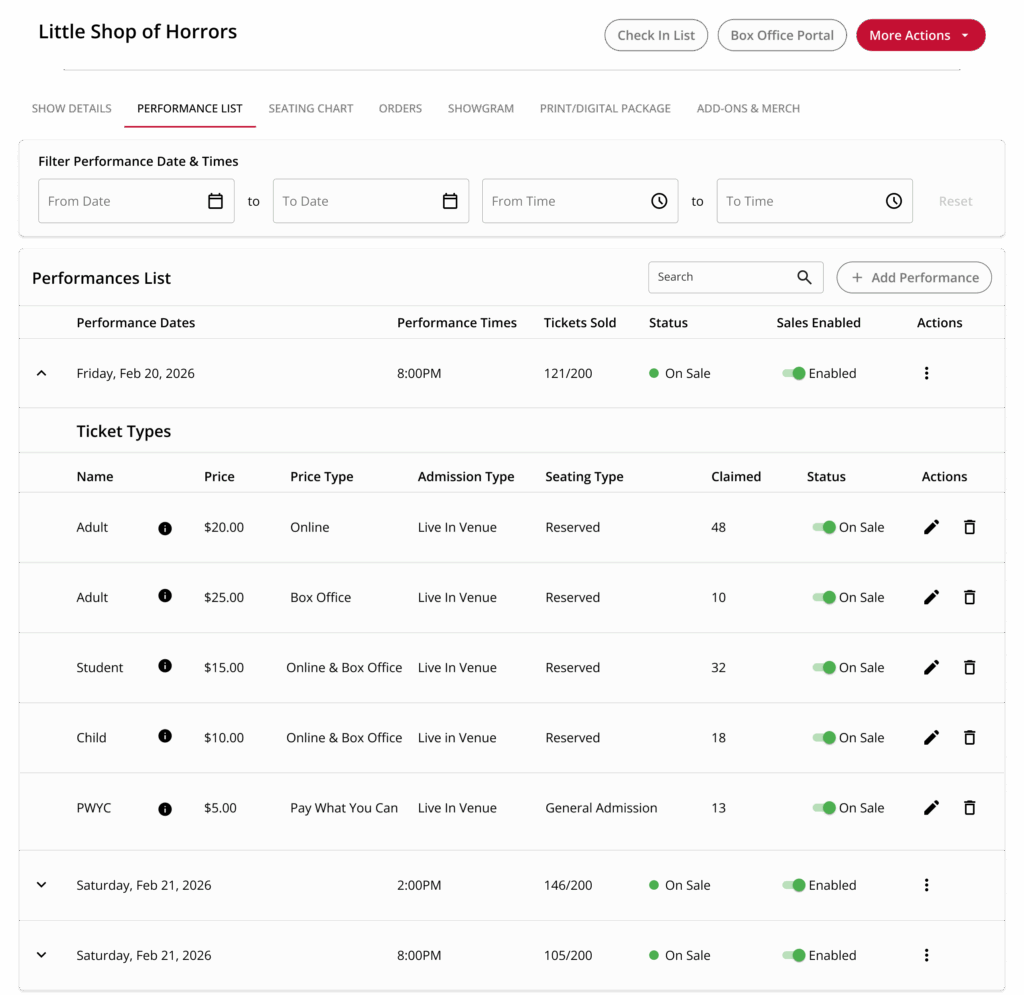
A great example is the new performance list tab, which completely reorganizes information related to your upcoming performances.
New Performance List Features
- Dynamic Table View – Quickly see all of your performances in a new easy-to-read table view, and expand or collapse individual performances to see or hide details
- Built-in Actions – Easily revise tickets and ticket types, process refunds, reschedule performances, and more
- Integrated Patron Outreach – Send an email to all ticket buyers for a given per-performance basis with additional information they may need to know, such as if your parking lot is under construction or if the lead is out
- Add Performances – Add additional performances from within the performance list
- Control Sales – Toggle sales on or off with a single click
- Filter Performances – Quickly find a performance using new date and time filters
???????? Empowering Customers to Succeed
Taken collectively, these enhancements provide new controls and greater flexibility to box office teams, empowering them to operate more efficiently and to provide better customer service to patrons. These exciting updates reflect our continuous commitment to making our platform as fast, easy, and powerful as possible.
The new box office experience is available now by default to all OTS customers. If you’re an OTS customer and have questions, we’re here to help – simply reach out to your account manager. If you’re interested in learning more about becoming a customer, we invite you to book a demo to learn more about how our ticketing platform for the performing arts can help your organization to win.